How Automatic Fall Detection Works: Best Devices in 2026
Automatic fall detection is a feature on some medical alert devices that uses an accelerometer to recognize the motion of a hard fall (a rapid drop, an impact, and then stillness) and connects to a 24/7 monitoring center on its own, without the user pressing a button. It is offered as a paid add-on (about about $10/month on the systems that publish it) on most systems, or built in on some smartwatches and on one no-fee pendant. Detection is a useful backup but is not 100% reliable, so it complements rather than replaces the manual help button.
Why it matters
About 1 in 4 adults aged 65 and older fall each year, and falls are the leading cause of injury-related death in that age group (CDC older-adult falls data). The critical risk is often not the fall itself but lying undetected for a long time afterward. Automatic detection summons help even when the user cannot reach the button.
- Best overall: Medical Guardian MGMove with fall detection, about $48.95–$52.95/mo
- Best value: Bay Alarm Medical SOS All-in-One 2, about $44.95/mo
- Most affordable: Lively Mobile2 with fall detection, about $34.98/mo
The comparison ledger
Fall Detection Devices at a Glance
| Feature | Medical Guardian | Bay Alarm | Lively Mobile2 | Lifeline HomeSafe | Apple Watch |
|---|---|---|---|---|---|
| Base monitoring price | ~$38.95–$42.95/mo | $34.95/mo | $24.99/mo | ~$29.95/mo | $249 device |
| Fall detection cost | +$10/mo | +$10/mo | +$9.99/mo | ~+$15/mo | Built-in |
| Total with fall detection | ~$48.95–$52.95/mo | $44.95/mo | $34.98/mo | ~$44.95/mo | $0/mo after device |
| GPS coverage | Yes | Yes | Yes | No | Yes |
| Works outside home | Yes | Yes | Yes | No | Yes |
| Waterproof | IP67 | Yes | IPX7 | Yes | 50m |
| Contract required | None | None | None | Month-to-month | None |
| 24/7 professional monitoring | Yes | Yes | Yes | Yes | No (calls 911) |
Full reviews
Top Fall Detection Medical Alert Systems
Medical Guardian MGMove
$39.95/mo
Fall detection: +$10/mo
Total: $49.95/mo
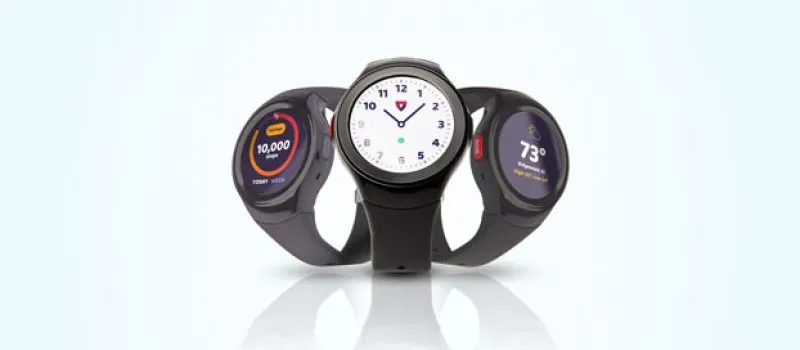
Form Factor
Smartwatch
Coverage
Home + GPS
Battery
Up to 3 days
Waterproof
IP67
- Wrist-worn, harder to forget than a pendant
- GPS tracks location outside the home
- Long battery life for a smartwatch
- Fall detection is a $10/mo add-on
- Watch form may feel unfamiliar to some seniors
Best overall fall detection watch for elderly: combines automatic detection with GPS and 24/7 US-based monitoring.
Visit Medical Guardian →If you buy through this link we may earn a commission; it never changes our ratings.
Bay Alarm Medical SOS All-in-One 2
$34.95/mo
Fall detection: +$10/mo
Total: $44.95/mo
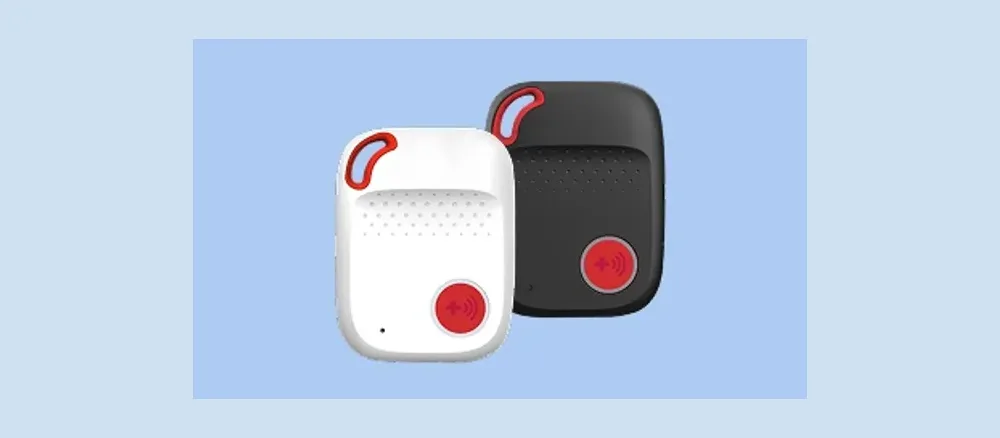
Form Factor
Pendant or wristband
Coverage
Home + GPS
Battery
Up to 5 days
Waterproof
Yes
- Home base + GPS in a single device
- Free second-user monitoring included
- Works on both AT&T and Verizon networks
- Fall detection add-on brings total to $44.95/mo
- App interface not as polished as Medical Guardian
Best value with fall detection: all-in-one home-plus-GPS coverage from a UL-listed monitoring center for less than Medical Guardian.
Visit Bay Alarm Medical →If you buy through this link we may earn a commission; it never changes our ratings.
Lively Mobile2
$24.99/mo
Fall detection: +$9.99/mo
Total: $34.98/mo
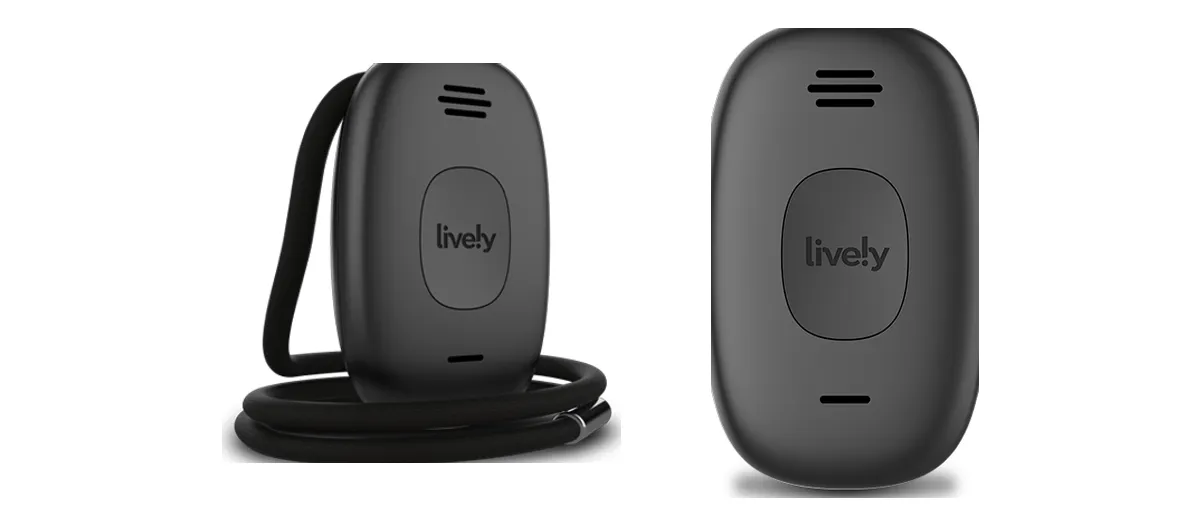
Form Factor
Compact mobile device
Coverage
Nationwide GPS
Battery
Up to 40 hours
Waterproof
IPX7
- Cheapest fall detection add-on ($9.99 vs $10–$15 at competitors)
- No contract required
- Urgent Response button with GPS
- Fall detection only works while wearing the included lanyard
- No dedicated in-home base station
Most affordable fall detection option. Best for budget-conscious families who still need GPS coverage outside the home.
See It at Lively →If you buy through this link we may earn a commission; it never changes our ratings.
Lifeline HomeSafe with AutoAlert
~$29.95/mo
Fall detection: ~+$15/mo
Total: ~$44.95/mo
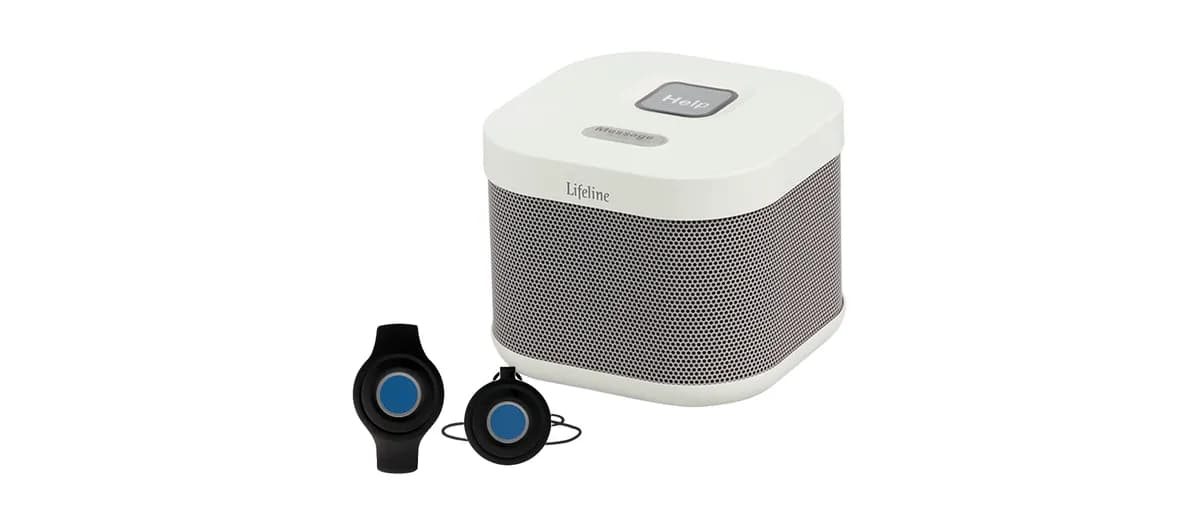
Form Factor
Pendant (home only)
Coverage
In-home only
Battery
Up to 5 days
Waterproof
Yes
- Lifeline pioneered medical alert systems in 1974 (formerly Philips Lifeline)
- Lightweight pendant comfortable for all-day wear
- Strong in-home detection range
- No GPS: only works at home
- Fall detection add-on is the most expensive at $15/mo
Best for seniors who rarely leave home and prefer a familiar pendant style from a long-established brand.
Visit Lifeline →If you buy through this link we may earn a commission; it never changes our ratings.
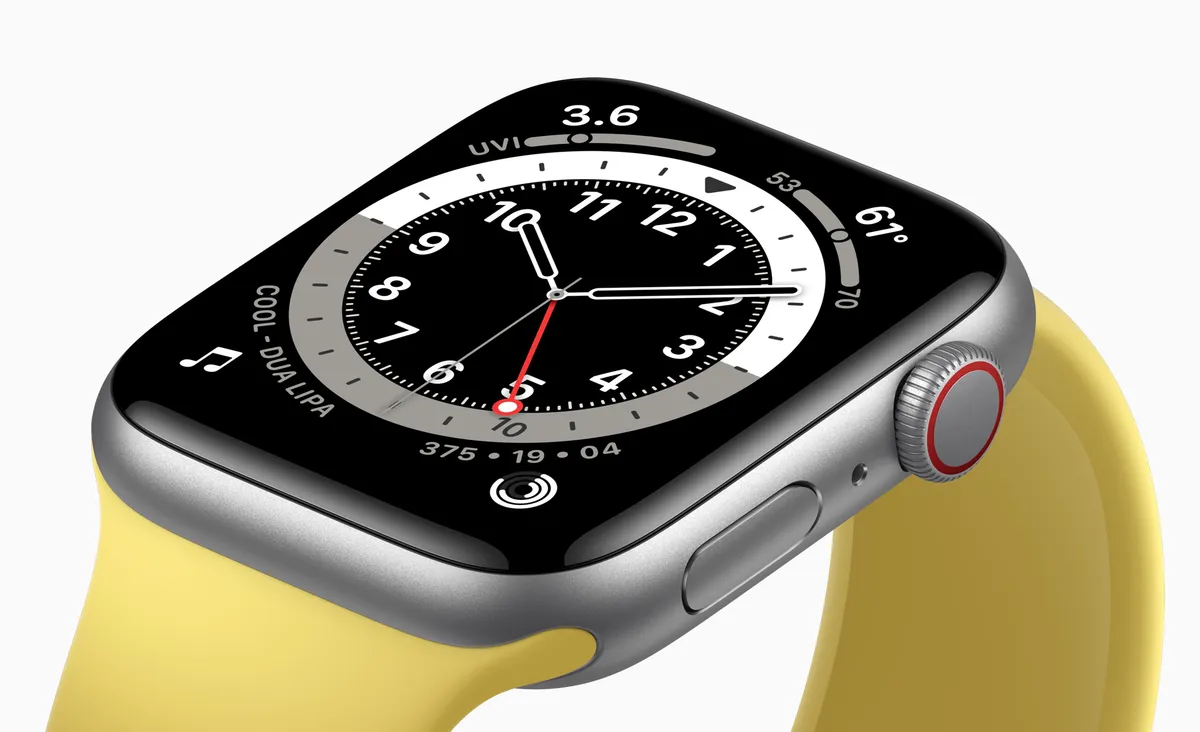
Apple Watch SE (2nd Gen)
$249 (device cost)
Fall detection: Built-in (no add-on)
Total: $0/mo (calls 911 directly)
Form Factor
Smartwatch
Coverage
GPS + cellular
Battery
Up to 18 hours
Waterproof
50m
- Fall detection built in (no monthly add-on fee)
- Emergency SOS calls 911 directly
- Full smartwatch features
- Requires an iPhone
- No 24/7 professional monitoring by default
- Battery needs daily charging
Best for tech-savvy active seniors who use iPhone and prefer calling 911 directly over professional monitoring.
Check Price on Amazon →If you buy through this link we may earn a commission; it never changes our ratings.
How it works
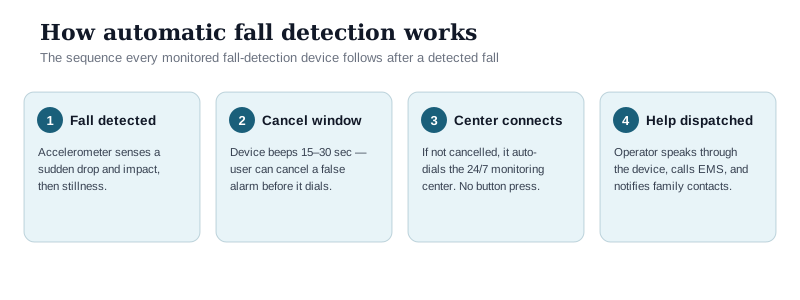
How Automatic Fall Detection Works
The honest limits
How Accurate Is Fall Detection: What It Catches and What It Misses
No medical alert manufacturer or independent body publishes a single certified accuracy figure, and accuracy varies by device, wear location, and the type of fall. The honest takeaway from published research and manufacturer guidance is that automatic detection reliably catches hard, sudden falls (a clear drop followed by impact) but is far less reliable for the kinds of falls that are common among frail seniors:
Under the hood, the device continuously samples a three-axis accelerometer (and on some models a gyroscope). Its firmware watches for a specific signature: a brief period of near-free-fall acceleration, then a sharp impact spike, then a stretch of unusual stillness or an off-vertical body orientation. Only when all three phases line up above the manufacturer's preset thresholds does it declare a fall and open the 15–30 second cancel window. That threshold logic is exactly why a slow slump or a cushioned fall slips through (the free-fall and impact phases never cross the trigger level) while a hard drop onto tile fires reliably. The thresholds are tuned to keep false alarms tolerable, so manufacturers err toward missing soft falls rather than crying wolf all day.
- Slow or “sliding” falls: gradually sinking to the floor or sliding out of a chair often does not produce the sharp acceleration signature the sensor looks for, so it can be missed.
- Falls onto soft surfaces (a bed, a couch, deep carpet) cushion the impact and are detected less consistently.
- False alarms run the other way: sitting down hard, setting the pendant on a table, or vigorous activity can trigger an alert. This is why every reputable device includes a 15–30 second cancel window with an audible warning before it calls for help.
Because of these gaps, clinical and consumer-safety guidance is consistent: treat automatic fall detection as a safety net, not a guarantee. The manual help button remains the most reliable way to summon help, and the device only works if it is actually worn, including in the bathroom and shower, where falls are most likely. For a senior with a history of falls, balance problems, or conditions such as Parkinson's disease, the add-on is usually worth it precisely because it covers the case where they cannot press the button.
Who it's for
Who Actually Needs Fall Detection?
The add-on earns its cost for seniors at elevated fall risk who spend time alone:anyone with a history of falls, a balance or gait disorder, a neurological condition, or medications that cause dizziness. It matters far less for someone who is rarely alone or won't reliably wear the device.
The value of automatic detection tracks two things: how likely a fall is, and how long the person might lie there before anyone notices. About 1 in 4 adults 65 and older fall each year, and falls are the leading cause of injury death in that group (CDC). The CDC's STEADI initiative and the National Institute on Aging flag a consistent set of risk factors. Fall detection is most worth the $10/month when several of these apply:
- Lives alone: no one else in the home to notice a fall and call for help.
- Prior fall history: a fall in the past year is the single strongest predictor of the next one.
- Balance or gait disorders: unsteadiness, shuffling, or frequent trips.
- Neurological conditions: Parkinson's disease, a prior stroke, multiple sclerosis, or peripheral neuropathy that dulls foot sensation.
- Blood-pressure medications or orthostatic hypotension: drugs that can cause a sudden drop in blood pressure and lightheadedness on standing.
- Osteoporosis: the fall itself may be survivable, but a resulting hip or wrist fracture is high-cost and slow to heal.
- Cognitive impairment: early dementia or confusion, where the person may not think to (or be able to) press the button after a fall.
It is lower value (and sometimes not worth paying for) when the person is rarely alone (a spouse or caregiver is almost always within earshot), when they are unwilling to wear the device consistently (a detector on the nightstand protects no one), or when they are active and steady with no risk factors above. In those cases the standard help button often covers the real need at a lower monthly cost. If risk is borderline, our Medical Guardian review and Bay Alarm Medical review both break down which plans let you add detection later without switching devices, a reasonable middle path.
Who offers it
Which Medical Alert Systems Offer Fall Detection?
Almost every major monitored provider offers automatic fall detection, but the price and whether GPS is included vary. Built-in detection (no monthly add-on) is generally found only on consumer smartwatches.
| Provider | Fall detection | Add-on cost | Works outside home |
|---|---|---|---|
| Medical Guardian | Yes (most plans) | +$10/mo | Yes (GPS plans) |
| Bay Alarm Medical | Yes (any plan) | +$10/mo | Yes (GPS plans) |
| Lively Mobile2 | Yes | +$9.99/mo | Yes |
| Lifeline | Yes (AutoAlert) | +$15/mo | In-home only |
| Apple Watch SE / newer | Built in | No add-on | Yes |
| Life Alert | No automatic detection | N/A | Limited |
Buyer's checklist
How to Choose a Fall Detection Device
Form factor determines whether they will actually wear it
The best fall detection device is the one your parent will wear every day. A pendant left on the nightstand cannot detect a fall in the bathroom. Some seniors resist anything visible; a watch looks more normal. Others find watches uncomfortable. Choose based on what they will actually put on each morning. Compliance matters more than specs.
Calculate the real total cost, not the advertised base price
Automatic fall detection is almost always a paid add-on, not included in the base plan price. Verified add-ons run from $9.99/month (Lively) to $10/month (Bay Alarm Medical). MobileHelp and ADT charge for it too but do not publish the price where we can check it. A plan advertised at $34.95/mo can cost $44.95/mo with fall detection. Always calculate the full monthly total before comparing options.
GPS is worth it for anyone who leaves home
An in-home system will not detect a fall in a parking lot, at a grocery store, or at a neighbor's house. If your parent leaves home at all, choose a GPS-enabled device. The price premium over an in-home-only system is typically $5–10/month and is almost always worth it.
Waterproofing is non-negotiable
Falls happen most often in the bathroom and shower. Any fall detection device must be worn in the shower; look for IPX7 or better (withstands submersion in 1 meter of water for 30 minutes). Do not accept vague splash-resistant claims.
Fall detection is a backup, not a replacement for the help button
Automatic fall detection is a backup, not a replacement for the help button. Hard falls onto hard floors are detected most reliably; slow falls onto soft surfaces or in unusual positions may be missed. The manual help button remains the most reliable way to call for assistance, and detection is most valuable when the user cannot reach the button.
What it costs
Fall Detection Cost Breakdown (2026)
| System | Base plan | Fall detection | Total/mo |
|---|---|---|---|
| Lively Mobile2 | $24.99 | +$9.99 | $34.98 |
| Bay Alarm Medical | $34.95 | +$10.00 | $44.95 |
| Medical Guardian MGMove | ~$38.95–$42.95 | +$10.00 | ~$48.95–$52.95 |
| Lifeline HomeSafe | $29.95 | +$15.00 | $44.95 |
| Apple Watch SE | $249 (device) | Built-in | $0/mo |
Questions we hear most
Frequently Asked Questions
How does automatic fall detection work on medical alert devices?
Fall detection uses accelerometers to identify the motion pattern of a hard fall (a sudden downward acceleration followed by impact and stillness). When detected, the device plays an audible beep and waits 15–30 seconds for the user to cancel. If not cancelled, it automatically connects to a 24/7 monitoring center without requiring the user to press a button.
How accurate is fall detection on medical alert systems?
Accuracy varies by device and by the type of fall, and no manufacturer publishes a certified figure. Hard, sudden falls onto hard floors are detected most reliably. Slow-motion falls, stumbles without full impact, and falls onto soft surfaces are more likely to be missed. False alarms can occur from sitting down hard, dropping the device, or vigorous activity. No fall detection system is 100% reliable; the manual help button remains critical.
What is the best fall detection device for elderly who live alone?
For elderly people living alone, Medical Guardian with the fall detection add-on (MGMove watch ~$48.95–$52.95/mo total) is our top pick. It combines automatic detection with GPS and 24/7 US-based professional monitoring on a month-to-month contract. Bay Alarm Medical at $44.95/mo is the best value option. For the lowest cost, Lively Mobile2 at $34.98/mo is the most affordable with GPS.
What triggers a false alarm on fall detection devices?
Common false alarm triggers include: sitting or lying down quickly, dropping the device on a hard floor, vigorous exercise, bending sharply, and bumping the device against a hard surface. Most devices include a 15–30 second cancellation window with an audible beep before connecting to the monitoring center, giving the user time to dismiss a false alarm.
Does Medicare cover fall detection devices?
Original Medicare (Parts A and B) does not cover fall detection medical alert devices. Some Medicare Advantage plans include a supplemental benefit for safety devices; check your specific plan. FSA and HSA funds can typically be used to purchase medical alert systems. Some states offer Medicaid waiver programs for low-income seniors.
Do fall detection pendants work in the shower?
Yes. Most medical alert fall detection devices are waterproof (IPX7 or higher) and designed to be worn in the shower, which is one of the highest-risk locations for falls in elderly adults. Always verify the waterproof rating before purchasing; look for IPX7 or better.
What is the difference between a fall detection pendant and a fall detection watch?
A pendant hangs from the neck and detects falls from chest or hip motion. A watch sits on the wrist and detects falls from wrist impact plus overall body motion. Overall accuracy is comparable; the most important factor is which form factor the user will wear consistently every day.
Can fall detection work outside the home?
Only if the device includes GPS cellular capability. In-home-only systems with a base station will not detect falls or connect to monitoring outside the home. Devices like Medical Guardian MGMove, Bay Alarm Medical SOS All-in-One 2, and Lively Mobile2 include cellular GPS and work anywhere with cell coverage.
How quickly does fall detection alert a monitoring center?
Most devices connect to monitoring within 30–60 seconds of detecting a fall, including the cancellation window. Once connected, a trained monitoring agent typically responds in under 30 seconds. Emergency services can usually be dispatched within 2–3 minutes of the initial fall detection.
Is fall detection worth the extra monthly cost?
Yes, for most high-risk seniors. Fall detection add-ons cost about $10/month where the price is published, roughly $0.33/day. For a senior living alone, with a history of falls, balance issues, or conditions like Parkinson's disease that increase fall risk, automatic detection ensures help arrives even if they cannot press the button. The monthly cost is small compared to the medical costs from a fall that goes undetected for hours.
Who should not bother with fall detection?
It adds little value for someone who is rarely alone, who has a spouse or caregiver almost always within earshot, or who will not wear the device consistently. A detector left on the nightstand cannot help. It also matters less for active, steady seniors with no fall history or risk factors. In those cases the standard help button usually covers the real need at a lower monthly cost. The add-on is aimed at seniors who live alone or spend hours alone and carry elevated fall risk (prior falls, balance or gait disorders, neurological conditions, blood-pressure medications, osteoporosis, or cognitive impairment).
For most families, Medical Guardian with the fall detection add-on (MGMove watch ~$48.95–$52.95/mo) offers the best combination of automatic detection, GPS, and 24/7 US-based monitoring. If budget is the priority, Bay Alarm Medical ($44.95/mo) is nearly as capable at a lower total cost.
Related reviews
Sources & references
- CDC: Older Adult Falls Data
- CDC STEADI: Falls Prevention
- National Institute on Aging: Preventing Falls
- Medical Guardian: official site (pricing & fall detection)
- Bay Alarm Medical: official site (plans & add-ons)
- Lifeline: AutoAlert (formerly Philips Lifeline)
- Apple: Use fall detection on Apple Watch
Pricing and plan details are drawn from each provider's official website and verified periodically; confirm current rates at the point of purchase. Statistics are cited from the sources above.